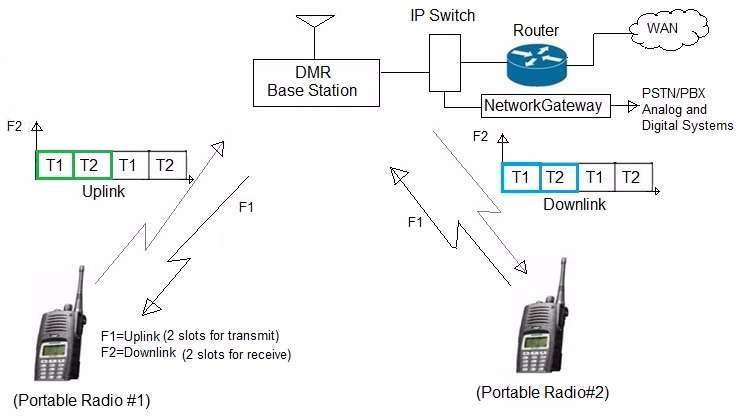
Digital radio works a bit differently compared to traditional analog radio. It's a very interesting topic and we'll be talking about it briefly.
Instead of sending your voice directly as an analog signal, digital modes convert your voice into data. That data gets transmitted, received, and then turned back into audio on the other end.
This opens up a lot of new possibilities, but it also introduces new terms and concepts that can feel confusing at first.
What is DMR?
DMR stands for Digital Mobile Radio. It’s one of the most popular digital voice modes used in amateur radio.
At a basic level, DMR takes your voice, compresses it into digital data, and sends it over the air. On the receiving side, that data is decoded back into audio.
The main advantages are:
- More efficient use of bandwidth
- Better audio clarity in weak signal conditions
- The ability to organize conversations using groups and channels
But to use it properly, you need to understand a few key pieces.
Time Slots
One of the biggest differences with DMR is the use of time slots.
Instead of one frequency carrying one conversation at a time, DMR splits a single frequency into two alternating time slices:
- Time Slot 1 (TS1)
- Time Slot 2 (TS2)
This is done using a method called TDMA (Time Division Multiple Access). Your radio rapidly switches between transmitting and receiving in very short bursts.
In practice, this means:
- Two separate conversations can happen on the same frequency
- You need to select the correct time slot to hear the right traffic
Talk Groups
Talk groups are how conversations are organized in DMR.
Instead of everyone sharing one channel, users connect to specific talk groups. You can think of them like virtual rooms.
For example:
- A worldwide talk group
- A regional or country-specific group
- A local repeater group
When you transmit, your signal is sent to that talk group and then distributed to everyone else listening to it.
Color Codes
Color codes in DMR are similar to CTCSS tones in analog radio.
They are used to separate different systems operating on the same frequency. A repeater will only respond to signals that match its configured color code.
Most setups use:
- Color Code 1 by default
But this can vary depending on the repeater.
If your color code doesn’t match, your signal won’t get through, even if everything else is correct.
DMR ID
Before you can use DMR networks, you need a DMR ID.
This is a unique number assigned to you, similar to a callsign but used within the digital system. It identifies you on the network when you transmit.
You usually register for one online, and then program it into your radio.
Without a valid DMR ID, most repeaters and networks won’t allow you to transmit.
Digipeaters
Outside of DMR, you’ll also hear about digipeaters, especially in packet radio and APRS.
A digipeater is a digital repeater that receives data and retransmits it. Instead of voice, it handles digital packets.
This is useful for:
- Extending the range of data transmissions
- Relaying position reports (like in APRS)
- Passing messages across a network
Unlike voice repeaters, digipeaters don’t involve real-time conversation. They simply pass data along.
How It All Fits Together
When you use DMR in practice, your setup usually looks like this:
- Your radio is programmed with:
- A frequency
- A color code
- A time slot
- A talk group
- Your DMR ID
When you transmit:
- Your voice is converted into digital data
- Sent to a repeater
- Routed through a network
- Delivered to other users on the same talk group
Digital radio adds a layer of complexity compared to analog, but it also gives you a lot more flexibility. You can reach people across the world, organize conversations more cleanly, and make better use of limited spectrum.
The hardest part is usually getting everything set up the first time. After that, it becomes much more intuitive.
If you take the time to understand the basics like time slots, talk groups, and color codes, the rest starts to fall into place pretty quickly.